


Insignia Fire TV Remote
3.8170.00 Reviews
App Specs
- Version
- 1.0.11
- Updated On
- License
- Free
- Downloads
- 100,000+
- Developer
- Naba
- Categories
- House & Home
- Platform
- Android
Screenshots
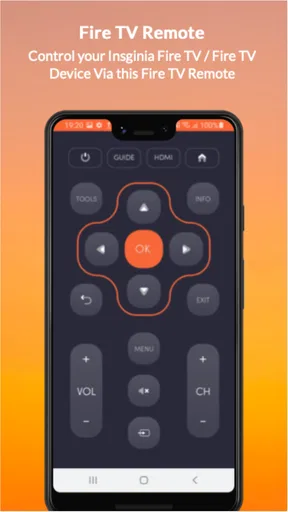
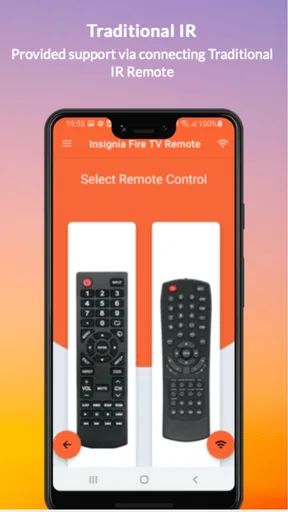
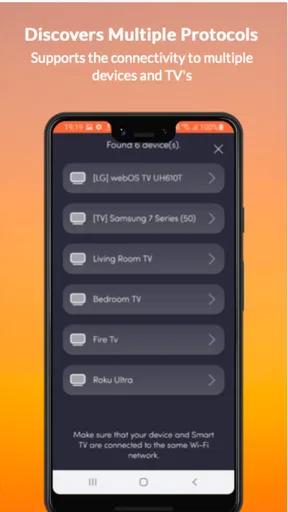
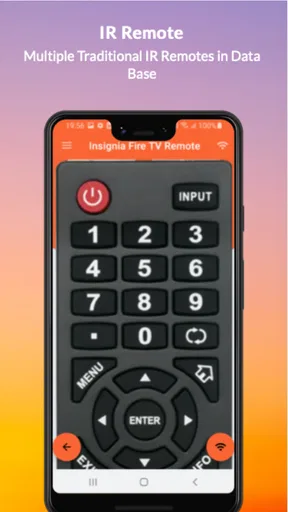
 Analysis by AppCompare
I’ve found that a phone remote is most useful when I treat it as a practical backup rather than a complete replacement for every way I control a television. Insignia Fire TV Remote is aimed at Fire TV and Insignia Fire TV owners who want to navigate from a phone, and that focused purpose is its clearest appeal. When the physical remote is misplaced, or typing with its buttons becomes tiresome, having another way to get around can make settling in for a show less of a chore.
It is a free House & Home app from Naba, with an Everyone age rating. It has a 4.0 average from around 1.5 thousand ratings, and more than 100 thousand installs. Those figures suggest that plenty of people have tried it, but I’d still judge it by the fit with your own setup: this is a companion for compatible Fire TV use, not a universal controller for every television or streaming box.
A sensible routine starts with the connection
Before relying on a phone as your remote, I’d make sure it and the Fire TV are connected to the same Wi-Fi network, then open the app and check whether the device appears. This is a small but useful habit: if the connection fails, checking the network first is more productive than tapping controls repeatedly. Keeping the physical remote nearby during initial setup also gives you a fallback while you confirm that the phone can reach the TV.
That first check matters especially in homes where guests use a separate Wi-Fi network, or where a phone has switched to mobile data. A remote app depends on the local connection in a way a handheld physical remote does not. If the television is asleep, the network has changed, or the phone is connected somewhere else, the convenience can disappear until the setup is put right. I’d test it before movie night rather than discover a connection problem after everyone has settled down.
Getting Started with the App
First things first, downloading the Insignia Fire TV Remote app is a breeze. Available on both Android and iOS, it’s a quick install, and I was ready to roll in no time. The app itself has a clean and straightforward interface, which is a relief because nobody wants to wrestle with a complicated setup when all we want is to dive into our favorite content.
Once you’ve got the app installed, connecting it to your Fire TV is as simple as pie. Just make sure your phone and Fire TV are on the same Wi-Fi network. The app automatically detects your device, and with a quick tap, you’re paired. Easy peasy, lemon squeezy!
Settings and fit for your setup
I’d spend a moment checking the phone’s Wi-Fi connection and the Fire TV’s network before assuming the app itself is at fault. If you use more than one Fire TV, be deliberate about selecting the intended device before you start navigating; otherwise, a perfectly responsive remote can still be controlling the wrong screen. A quick device check is an easy way to avoid interrupting someone else’s viewing.
Worth Reading Before You Choose

EA SPORTS FC Mobile 26 Is a Bigger Football Game, but It Takes Time

Flipboard Shows What News Apps Must Do Beyond the Feed

Switching to Android Auto Means Rethinking Your Driving Routine

Google Calendar Makes a Crowded Week Easier to Manage

Ludo King Makes the Most of the Minutes Between Plans

Baby Panda World Brings Quick Play to Modern Phones, but Its Game Library Feels Busy
The app is currently version 1.0.11 and supports Android 5.0 or later. That makes it worth checking compatibility on an older handset before planning to use it as a permanent backup. The app is free, which makes trying it low-risk, but I’d still install it on the phone you actually keep near the sofa. A remote app is only convenient if that phone is charged, connected, and within reach when you need it.
Features That Stand Out
Now, let’s talk about the cool stuff—the features. The app turns your smartphone into a fully functional remote control. It has everything you could need, from the basic navigation controls to more advanced options like voice search. Say goodbye to endless scrolling and hello to finding exactly what you want with just a quick voice command.
One of my favorite features is the keyboard functionality. Typing on a traditional remote can be a nightmare, especially when you're trying to search for that obscure movie title. With the app, typing is a breeze, and I found myself searching and browsing much faster. Plus, the app supports multiple Fire TV devices, so if you’ve got more than one, you’re covered!
For a more repeatable search routine, I’d use the phone keyboard for exact titles, actor names, or other text that would take several button presses with a conventional remote. It is especially handy when you already know what you want to watch; it reduces the fiddly part without changing how you choose or play content. For broad browsing, though, the Fire TV’s on-screen menus may still feel more natural, so I wouldn’t expect a phone keyboard to make every kind of discovery better.
Faster habits, without expecting magic
Voice search can be useful when you want to ask for something without spelling it out, while text entry is the safer choice when a title is unusual or easy for voice recognition to mishear. I’d switch between the two rather than treating either as the answer to every search. That small distinction can save time: speak a familiar request, then type when accuracy matters more than keeping your hands free.
In a shared living room, the phone also gives you a quiet way to handle navigation without passing the physical remote around. If another person is watching and you need to enter a title or move through a menu, a phone can be less disruptive than leaning over to retrieve the handset. The trade-off is that the phone’s screen and controls need your attention, so it is not automatically better when you want to keep your eyes on the show.
Compared with the usual alternatives, this app sits between the bundled physical remote and a general-purpose smart-home controller. A physical remote is ready to grab and doesn’t depend on your phone’s battery or Wi-Fi, while this app is more comfortable for typing and useful when the handset has gone missing. A broader control app may suit a household with several kinds of equipment, but for someone focused on a Fire TV or Insignia Fire TV, a dedicated remote is the more straightforward idea. I would not choose this app to control unrelated devices.
Performance and Usability
In terms of performance, the app runs smoothly without any noticeable lag. The buttons are responsive, and navigating through the menus feels intuitive. I particularly enjoyed how the app integrates with Alexa. Just press and hold the microphone icon and ask Alexa to play something, and boom, you’re watching your show. It’s like having a personal assistant at your fingertips.
The app's interface is user-friendly, and I found myself getting used to it pretty quickly. Even if you're not the most tech-savvy person, the learning curve here is minimal. Everything is where you expect it to be, and the transition from using a physical remote to the app is seamless.
My practical tip is to keep the phone remote ready before you need it: connect to the household Wi-Fi, open the app, and confirm the right Fire TV is selected. That turns it into a dependable backup instead of a last-minute troubleshooting project. If the device does not appear, check that both are on the same network and try again; if your home network separates devices, the phone may not be able to find the television until that network arrangement is addressed.
There are limits to the convenience. A phone can be elsewhere, its battery can be low, and using a touchscreen means you may need to look down to find controls. Voice input is not ideal in every room or for every search, either; typing can be more precise, while the physical remote can be simpler for someone who prefers tactile buttons. If you regularly need a remote that works without a phone or network, keeping the original handset as your main controller is the better choice.
Who will get the most from it
I’d recommend trying it if you often misplace the remote, search for titles with long names, or want a convenient spare for a Fire TV household. It can also help when one person is holding the physical remote and another needs to enter text or move through menus. The strongest case is not that a phone does everything better; it is that it gives you a useful second route to common controls.
It is less compelling if you rarely use your phone near the television, dislike touchscreen controls, or expect one app to operate every brand of device in the room. It also won’t remove the need to check network access when pairing or reconnecting. In those situations, the supplied physical remote—or a control option designed for your wider device setup—may be the less frustrating everyday choice.
Final Thoughts
Honestly, the Insignia Fire TV Remote app is a must-have for any Fire TV user. It simplifies the whole viewing experience and adds a level of convenience that’s hard to beat. Whether it’s the intuitive navigation, the voice search feature, or the ability to connect multiple devices, this app covers all the bases.
If you’re tired of digging through couch cushions for your remote or just want a more streamlined viewing experience, give this app a try. It's the perfect companion for your Fire TV, turning your smartphone into the ultimate remote control.
In the world of streaming, where convenience is king, this app definitely earns its crown. Happy watching!
My final take is more measured: this is a handy, focused backup rather than a reason to put the physical remote away for good. I’d install it, pair it while everything is working, and use the keyboard for searches that are awkward to enter one character at a time. For a Fire TV owner who wants that extra flexibility, it is an easy option to test; for someone who needs a phone-free controller or broad device support, another approach will fit better.
Pros
- User-friendly interface enhances control.
- Quick setup with intuitive pairing process.
- Compatible with numerous Fire TV models.
- Voice search feature is highly responsive.
- Compact design perfect for easy handling.
Cons
- Limited customization for button functions.
- Requires batteries
- not rechargeable.
- Occasional connectivity issues reported.
- No backlight for buttons in dark rooms.
- Voice control may misinterpret commands.
FAQs for Insignia Fire TV Remote
What is the Insignia Fire TV Remote app used for?
The Insignia Fire TV Remote app is designed to enhance your experience with Insignia Fire TV devices. It allows users to control their TV using their smartphone, offering features like voice search, playback controls, and navigation. This app transforms your phone into a fully functional remote, making it convenient if the original remote is misplaced.
Is the Insignia Fire TV Remote app compatible with all devices?
The app is specifically designed for Insignia Fire TV devices. Before downloading, ensure your device is on the list of supported models. Compatibility may vary depending on the operating system version, so it's advisable to check the app store for specific device requirements and ensure your phone meets them.
Do I need an internet connection to use the Insignia Fire TV Remote app?
While an internet connection is required for initial setup and certain features like voice search, the app primarily connects to your TV via Wi-Fi. Both your smartphone and the Insignia Fire TV device must be on the same Wi-Fi network for the app to function correctly, ensuring seamless control.
Are there any costs associated with the Insignia Fire TV Remote app?
The Insignia Fire TV Remote app itself is free to download and use. However, some features might require a stable internet connection, which could incur data charges depending on your mobile plan. Always check for any in-app purchases or third-party service subscriptions that might be linked to the app.
How user-friendly is the Insignia Fire TV Remote app?
The app is designed with user-friendliness in mind, offering an intuitive interface that mimics a physical remote. Features like voice commands and customizable navigation make it easy for users to control their TV. However, first-time users might need a brief period to familiarize themselves with its functionalities.


